
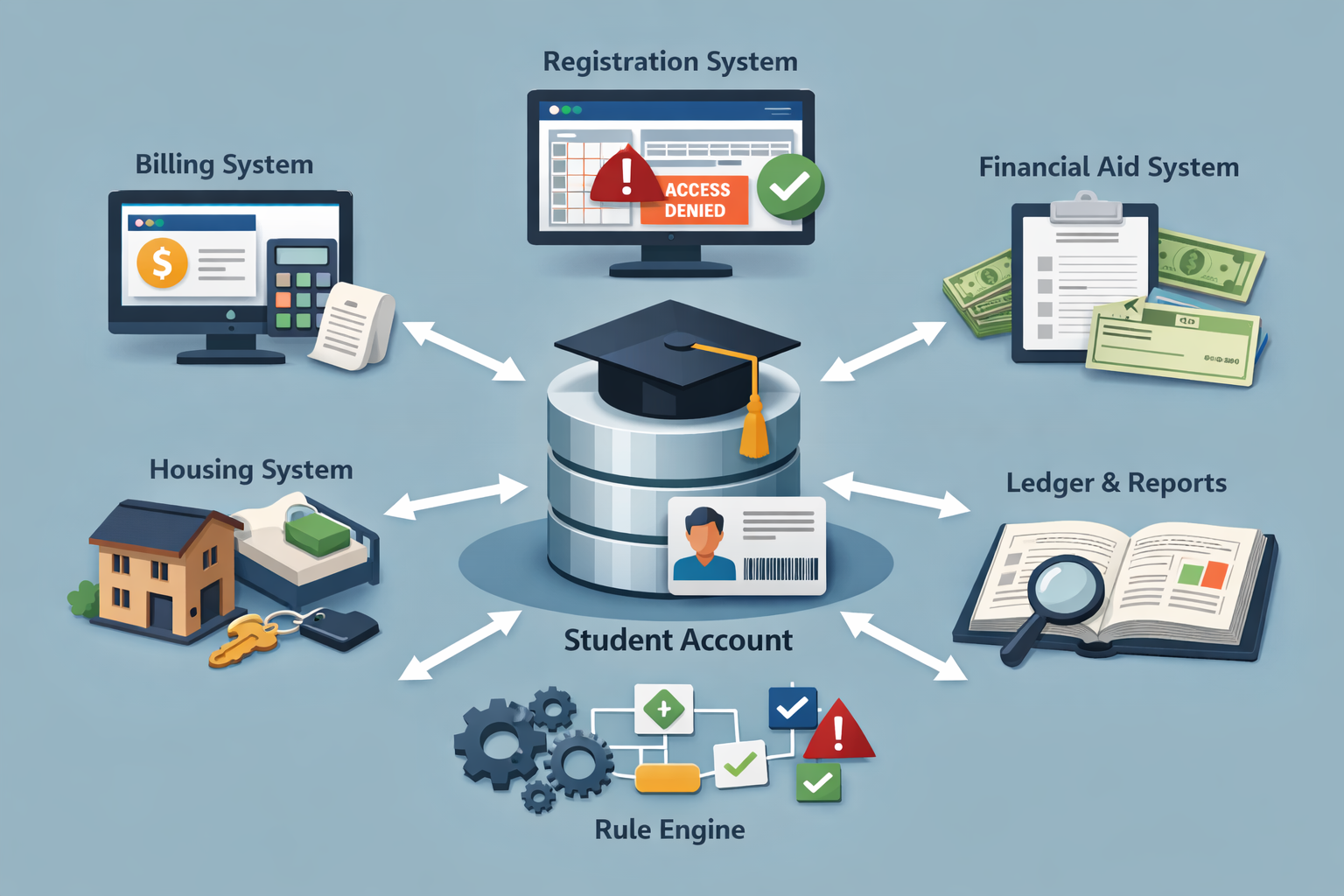
How University Student Information Systems Control Billing and Registration is best understood as a coordinated control environment: multiple modules write to a shared student account record, while separate engines calculate “eligibility” for actions like enrollment, add/drop, transcript release, graduation clearance, and housing check-in. The student portal is a display layer. The operational truth lives in ledgers, status codes, rule tables, and synchronization schedules.
How University Student Information Systems Control Billing and Registration becomes predictable when you treat it like a set of gated checkpoints. Each gate reads a different combination of fields—balance buckets, aging status, plan compliance, aid status, and compliance flags—then returns an allow/deny outcome to the registration engine. The system’s goal is not to mirror what looks “paid,” but to enforce campus policy through consistent, auditable logic.
This guide is intentionally architectural so it does not duplicate step-by-step tuition billing content in How College Tuition Billing Works Step by Step or hold-type explanations in How College Account Holds Work and What Triggers Registration Blocks. Instead, it focuses on how SIS modules and rule engines decide whether registration should proceed, including the timing and edge cases behind situations like tuition paid but cannot register classes, payment plan active but registration still blocked, and school balance shows zero but registration blocked.
For a neutral, higher-ed sector definition of student information systems, EDUCAUSE notes that student information systems manage student data, including registering students in courses and managing grades and transcripts
Key Takeaways
- Billing and registration are connected but typically validated by separate engines and tables.
- “Balance” is often segmented into buckets (current, past due, disputed, pending, sponsored) that behave differently in clearance logic.
- Rule engines can require thresholds, aging criteria, and compliance flags even when a portal looks “settled.”
- Timing matters: real-time payments may reconcile later, and batch jobs can lag clearance updates.
- Edge cases (reversals, reallocations, third-party billing delays) often change eligibility without changing the visible total.
Reference points used throughout this article include billing portal not updating after tuition payment and student account credit balance but enrollment blocked.
1) The Control Model: One Account, Many Engines
How University Student Information Systems Control Billing and Registration starts with a control model: a university may maintain one “student account” record, but multiple engines interpret that record differently. The bursar/cashiering system cares about ledger accuracy and receipting. The registration system cares about whether prerequisites and clearance criteria are satisfied. Financial aid systems care about eligibility and disbursement timing. Housing systems care about occupancy dates and charge authorization. Each module can be “correct” within its own scope while still producing a mismatch in what students expect.
Most U.S. campuses implement a layered approach: the ledger stores the financial truth, while a clearance layer translates financial status into actionable permissions. In practice, a registration transaction is often blocked by the clearance layer—not by the ledger itself. This is why a portal showing “$0.00 due” can still return a registration error.
To avoid duplicating your hold-focused article, note the distinction: a hold is a policy outcome, but the clearance layer is the mechanism that calculates outcomes. How University Student Information Systems Control Billing and Registration is about that mechanism.
Real-world example: A payment posts successfully, but a separate “clearance recalculation” job has not yet run, so the registration engine still reads the prior blocked state.
What to Understand
- Registration often reads a summarized clearance table rather than computing balance math at the moment of enrollment.
- Different modules can display different “truths” depending on refresh schedules and filters.
2) Ledger Anatomy: Charge Codes, Buckets, and Posting Hierarchies
How University Student Information Systems Control Billing and Registration depends on ledger structure. A student account ledger is not just a list of charges; it is a coded system. Charges are categorized (tuition, fees, housing, penalties, childcare, insurance, lab charges, transcript fees). Payments are also categorized by source (card, ACH, cash, scholarship, employer reimbursement, third-party sponsorship, financial aid disbursement).
Many systems segment balances into buckets such as current term, prior term, past due, disputed, pending, or sponsored. A “total balance” might be the sum of all buckets, while clearance rules might only consider specific buckets. A common design is to ignore “pending” credits until they finalize, even if the portal shows them.
Posting hierarchies matter because a payment can be applied differently than expected. Institutions frequently configure “oldest charges first,” “mandatory fees before tuition,” or “restricted funds” rules. That’s why a payment can reduce the total yet leave a specific category delinquent.
Real-world example: A payment reduces the overall balance, but the system allocates it to older debt, leaving the current-term lab fee unpaid and triggering registration blocked due to unpaid lab fee.
What to Check
- Whether the system tracks a “past due bucket” separately from “current balance.”
- Whether payment allocation rules prioritize certain charge categories.
3) Data Flows: How Billing, Aid, Housing, and Registration Communicate
How University Student Information Systems Control Billing and Registration is ultimately about data flows. Even in integrated enterprise platforms, modules behave like separate services. Billing posts charges and payments, then publishes an event to other modules (“payment posted,” “charge adjusted,” “reversal occurred”). Registration consumes a summarized status (“financial clearance = yes/no”). Housing consumes a different status (“eligible for move-in = yes/no”). Financial aid consumes eligibility statuses (“authorized,” “scheduled,” “disbursed,” “returned”).
Communication can be direct (internal APIs) or indirect (message queues, scheduled data exports). The indirect path introduces delay and reconciliation logic. When systems communicate by events rather than shared screens, “what you see” can lag behind “what the rule engine knows.”
Because your site includes cases like enrollment blocked due to third-party billing delay, it is useful to frame third-party billing as a separate data stream: sponsorship invoices may not post as cleared until documentation matches contract terms.
Real-world example: Employer sponsorship is approved, but the sponsorship feed posts once per week; until then the clearance layer treats the tuition as unpaid.
What to Understand
- A portal often consolidates multiple feeds; it is not the feed itself.
- Third-party billing often lives in a separate module with its own verification steps.
4) Clearance Logic: Rule Engines, Thresholds, and Eligibility Gates
How University Student Information Systems Control Billing and Registration becomes clearest when you zoom in on rule engines. A rule engine is not a “hold list”; it is a decision layer. It reads input fields (balance buckets, aging, plan compliance, dispute status, aid status) and applies a campus-defined policy configuration.
Common clearance gates include thresholds (e.g., a minimum past-due amount), aging rules (e.g., past due beyond 30 days), and category rules (e.g., specific fees always block regardless of amount). Some institutions also use term-based logic: prior-term debts may block future-term registration even if the current term is paid. Eligibility gates are often designed to be consistent and auditable, not negotiable in real time.
Keep the distinction from your hold article: the hold article explains “what triggers blocks.” This section explains the engine that implements those triggers, including how multiple triggers can be combined.
Real-world example: A $50 past due balance does not block because the threshold is $100, but a transcript fee does block because it is tagged as “always restrict” in the rule table, aligning with transcript hold due to unpaid fee.
What to Check
- Whether clearance uses thresholds by amount, by charge type, or by aging category.
- Whether the institution enforces a “prior term must be cleared” rule regardless of current term balance.
5) Timing: Real-Time Posting vs Batch Reconciliation
How University Student Information Systems Control Billing and Registration frequently “feels inconsistent” because posting and reconciliation are not the same event. Payment authorization can occur instantly (card) while settlement and ledger reconciliation occur later. ACH can be marked “received” while still being reversible. Aid can be authorized while not yet disbursed. Adjustments can be entered instantly but not reflected until nightly processes update summary tables.
Many campuses run batch jobs: recalculating balances, rebuilding clearance tables, posting late fees, applying payment allocations, and refreshing portal caches. Batch architecture means a student can be “financially resolved” in ledger detail while clearance remains unchanged until a recalculation cycle completes.
This framing is important for your existing case billing portal not updating after tuition payment. The portal delay is often a cache problem, while the clearance delay is often a summary-table problem. They can coincide but they are not the same mechanism.
Real-world example: A payment posts at 4:58 PM; the clearance rebuild runs at 2:00 AM; the student sees “paid” but remains blocked until the next day.
What to Understand
- Authorization, posting, reconciliation, and clearance are separate steps with different timing.
- Some systems prioritize fraud and reversibility controls over immediate clearance.
6) Payment Plans: Conditional Compliance Rather Than “Active/Inactive”
How University Student Information Systems Control Billing and Registration handles payment plans as compliance objects. “Active” may simply mean the agreement exists, not that it satisfies clearance. A plan can require an initial installment, a down payment, or on-time status to be treated as clearance-eligible.
Institutions frequently configure a plan to prevent escalation (late fees, collection referral) but still allow certain restrictions if the plan is newly created, has a missing first payment, or has a prior default flag. Payment plans typically modify clearance only after specific compliance conditions are met and recorded.
This structure connects to payment plan active but registration still blocked without duplicating the case-level content. Here, the focus is the compliance design: the system needs reliable proof of adherence.
Real-world example: A student enrolls in a plan at 11:30 PM; the plan is active, but the first installment is scheduled for next week, so the clearance layer does not treat the plan as “satisfying payment” yet.
What to Check
- Whether the plan must have a posted first installment before it changes clearance status.
- Whether a “default history” flag affects eligibility even if the plan is active now.
7) Aid Status Codes: Authorized vs Scheduled vs Disbursed
How University Student Information Systems Control Billing and Registration interacts with financial aid through status codes and timing windows. In many systems, “authorized” aid is not the same as “disbursed” aid. Authorization can reflect eligibility and an internal award package, while disbursement reflects funds actually posted to the ledger.
Clearance rules vary by campus. Some institutions allow anticipated aid to count toward clearance if it is within a disbursement window; others require actual posting. Anticipated aid can reduce a displayed balance while still being excluded from clearance math, depending on policy configuration.
This architectural distinction complements enrollment blocked while aid is pending by explaining why a “pending” label can matter more than the dollar amount.
Real-world example: Aid is scheduled for day 10 of the term; registration clearance runs on day 1 and requires posted funds, so the student remains blocked even though the award is visible.
What to Understand
- Most SIS frameworks treat disbursement as a ledger event, not a promise.
- Eligibility screens and ledger screens often represent different stages of the same process.
8) Disputes, Adjustments, and Status Flags That “Survive” a Payment
How University Student Information Systems Control Billing and Registration must maintain audit trails. Disputes and adjustments can generate flags that persist even after a payment posts. For example, a disputed charge may be tagged “under review,” and the campus may choose to restrict certain actions until the review resolves, even if the student pays to avoid escalation.
Similarly, adjustments can be temporary: a charge could be reversed and re-posted under a different code. That code shift can change how the rule engine treats the amount. Some flags reflect unresolved administrative states, not monetary totals, so paying does not automatically remove them.
Because your site includes collection-related issues (e.g., college sent account to collections for disputed late fee), it is useful to recognize that “disputed” and “delinquent” can coexist in system design: a campus can mark a fee as disputed while still aging it for escalation.
Real-world example: A late fee is under review, but the aging bucket still advances; the rule engine triggers restrictions on aging, not on dispute status.
What to Check
- Whether disputes suspend aging or only add a note/status code.
- Whether adjustments re-post under a new charge code that changes clearance behavior.
9) Reversals and Reallocations: Why “Nothing New Happened” But Clearance Changed
How University Student Information Systems Control Billing and Registration often surprises students after reversals. A reversal can be a returned payment, a reversed subsidy, or a sponsorship correction. Reversals do not always look like “new charges,” but they can change allocation and eligibility because the system rebalances prior transactions.
Allocation hierarchies matter here. If the system reallocates past payments to older or mandatory charges, a previously satisfied category can become delinquent. Reallocation logic can change clearance outcomes without changing the portal’s most obvious “total due” display.
This is particularly relevant to childcare-linked cases such as childcare subsidy payment reversed and billing adjustments such as enrollment blocked after payment reversal.
Real-world example: A subsidy reversal causes prior payments to be re-applied; tuition remains covered, but a childcare balance becomes past due, triggering restrictions in a combined clearance table.
What to Understand
- Reversals often trigger automated recalculation jobs that rebuild clearance tables.
- Cross-module debts (daycare + tuition) can be enforced through unified clearance logic.
10) Cross-Functional Restrictions: Registration vs Transcript vs Diploma Release
How University Student Information Systems Control Billing and Registration is only one part of a broader restriction framework. The same clearance infrastructure often governs transcript release, diploma release, and graduation clearance. The difference is which gate is evaluated and which actions it restricts.
Many institutions maintain a unified compliance table that tracks outstanding financial obligations and specific restriction types (enrollment, transcript, graduation). From a system perspective, these are different “permissions” attached to one financial compliance state.
This system-level view complements cases like diploma release delayed due to account balance and graduation clearance blocked by billing issue without repeating their action steps.
Real-world example: Registration is allowed under a threshold policy, but transcript release is blocked because transcript gates have stricter rules.
What to Understand
- Different restrictions can read different thresholds and charge categories.
- Some policies treat “academic progression” permissions differently from “record release” permissions.
11) Collections Escalation Markers in the SIS: Internal Path to External Referral
How University Student Information Systems Control Billing and Registration often includes escalation markers even before an account is transferred to an external agency. Universities may use internal “aging buckets” and “referral eligibility” flags that are computed automatically. These flags can trigger additional restrictions or communications workflows.
Even if the portal shows a single total, the SIS may track: current charges, past-due charges, disputed items, late fee accrual status, and referral readiness. Escalation markers are designed to support consistent administrative handling, not to create pressure or uncertainty.
This structural layer is the bridge between billing policy and the collection scenarios covered on your site, including unpaid tuition sent to collections and unpaid tuition credit report. The key point here is system tracking—what fields exist and how they influence clearance.
Real-world example: A balance remains small but is flagged “prior term delinquent,” which triggers a stricter clearance rule for upcoming registration.
What to Understand
- Referral eligibility is often computed by aging and status codes, not by total amount alone.
- Clearance rules may tighten once an account moves into a defined delinquency category.
12) Interpreting “Zero Balance” vs “Cleared” vs “Eligible”: A Practical System Map
How University Student Information Systems Control Billing and Registration can be summarized by separating three concepts that are often conflated:
- Zero balance: a display calculation of charges minus credits within a selected scope.
- Cleared: a compliance state in which all required buckets and flags meet policy.
- Eligible: an action permission returned to a specific transaction (register, add/drop, transcript).
These can diverge due to bucket segmentation, timing, and rule configuration. A system can legitimately show “0 due” while still returning “not eligible” for a transaction until clearance recalculates or a non-monetary flag resolves.
This framing supports related posts such as tuition paid but cannot register classes and school balance shows zero but registration blocked while keeping this article purely structural.
Real-world example: The portal’s “term balance” is zero, but a prior-term fee remains in a different bucket that the clearance engine reads.
What to Understand
- Portals often default to term-based views, while clearance engines may evaluate broader scopes.
- Eligibility is transaction-specific: the same account may be eligible for one action but not another.
Conclusion
How University Student Information Systems Control Billing and Registration is ultimately a story of architecture: modular ledgers, categorized buckets, rule engines, and timing cycles that translate financial status into permissions. This structural view avoids the “what to do next” pattern and instead explains why systems can behave in ways that look inconsistent on the surface.
When billing and registration are treated as coordinated but independently validated processes, portal mismatches become easier to interpret as design outcomes rather than contradictions. That design prioritizes consistency, auditability, and policy enforcement across thousands of accounts and transactions per term.
Related structural context appears across the site in topics like account hold due to balance and bursar hold meaning, but this article stays focused on the system machinery that makes those outcomes possible.